⬇️ ⬇️ ⬇️
ALBASTUZ3D
LIVE SUPPORT CHAT
FRP Bypass

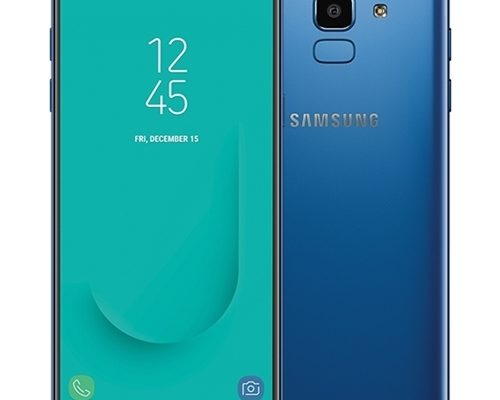
HOW TO BYPASS FRP ON SAMSUNG J6 MOBILE PHONE.

Factory Reset Protection (FRP) is a security feature that was introduced by Google that requires a mobile phone user to insert their Gmail account password in order to continue using their mobile phone normally after performing a hard reset on them. At most times, you find that a user has forgotten their mobile phone Gmail account password and so it is impossible for them to continue using their mobile phones. Do not worry because today I will show you how you can bypass FRP on your Samsung J6 mobile phone without the need for your Gmail account password. Follow the steps below carefully in order to have a successful result at the end.

SAMSUNG J6 FRP BYPASS PROCEDURE.

  1. Connect your Samsung J6 mobile phone on a WI FI network and tap on “next”.
  2. Accept the terms and conditions and tap on “agree” at the left bottom corner of your mobile phone and patiently wait for the page to finish loading.
  3. When asked for your Gmail account information, go back to the main page where it displays “start” by tapping the back button.
  4. Press the home button thrice (3 times) until you hear a talkback sound then draw an “L”. Note that it might require you several tries for it to work, so don’t give up.
  5. Afterward, a global context menu will display on your screen where you are required to select the “Text to speech settings” option.
  6. Click on the gear-like icon which symbolizes the “settings” at the far right corner of your Samsung J6 mobile phone.
  7. In the settings, tap on “Install voice data” and press the home button thrice to pause talkback settings.
  8. Afterward, select the first option by tapping on the arrow facing down on the far right end of your Samsung J6 mobile phone and wait for the page to wait.
  9. Agree to the terms and conditions and tap “start”.
  10. On the next page, update the Samsung Galaxy Apps and after completion tap on the first option that you tapped earlier on.
  11. After tapping on the option, you will be directed to the Samsung store. While in the Samsung store, tap on the search icon at the top of your device’s screen beside the three dots and search for “Samsung internet browser”.
  12. Download the application and after complete download opens the application.
  13. Tap on the search bar of the browser and search for “albastuz3d.net” and click “Go” on your Samsung J6 mobile phone keyboard.
  14. Scroll down and tap on two options labeled “Android 8 .apk” and “FRP bypass. Apk” in order to download them.
  15. You can view the downloads in the downloads menu by tapping on the three horizontal lines at the bottom right of your Samsung J6 mobile phone.
  16. After complete downloads, tap on the “Android 8. apk” and install it. After successful installation, tap on “Done”.
  17. Thereafter, tap on the “FRP bypass. apk” to install and open the application after successful installation.
  18. After you open the application, you will be directed to a page asking for a password. On this page, tap on the three dots at the corner of your Samsung J6 mobile phone and select the option “Browser sign-in”.
  19. You will then be asked for an email address. Now here you can insert ANY email address with the correct password and wait for the page to load.
  20. After the page has finished loading, restart your Samsung J6 mobile phone by pressing the power key.
  21. Click on “next” on your Samsung J6 mobile phone and keep doing this to each and every page but “skip” where necessary.
  22. Congratulations!!! You are all done. You have successfully bypass FRP on your Samsung J6 mobile phone with those few and simple steps. You can now continue using your Samsung J6 mobile phone normally again.

For further assistance, watch the following video:

FRP Bypass

How to bypass google account(FRP) on Samsung Galaxy Note20 Ultra

What is FRP/Factory Reset Protection

 Factory Reset Protection (FRP) also known as Activation Lock is a security feature to protect your Android device from unauthorized access. This was introduced on android devices with android version 5.1 and higher.FRP is automatically activated when you set up a google account on your device. Once FRP is activated, it prevents use of a device after factory data reset(hard reset) unless you login with the same google account or gmail account.

Bypass Google Account (FRP) On Samsung Galaxy Note20 Ultra

Requirement Needed For Samsung Galaxy Note20 Ultra FRP Bypass

 
  • Frp Bypass application.
  • Google Account Manager application.


Steps To Bypass Samsung Galaxy Note20 Ultra FRP


1. First tap start then connect the Samsung Galaxy Note20 Ultra to a WIFI hotspot or data


2. Now after connecting your internet , go back to the start and change the language as shown in the picture below.(Don’t worry, changing the language will enable you to have more keyboard option and also have the access to change the keyboard language settings).


3. After changing the language, click the blue option(next) to proceed to the page as shown in the picture below.


4. Now tap the back option to return to  “connect to Wi-Fi” then tap the last option(See all Wi-Fi networks).


5. Next tap the “+”icon(add network).


6.You will be brought to pop up keyboard with the selected language. Long press the “world “icon just next to space key as shown on the picture below.


7.Tap the last option just below the keyboard option then tap again the last blue option(below QWERTY).


8. You will be brought to the options as shown in the picture below. Select  the second option (black in color with brackets).


9. You will see a one or two keyboard loading. Click on the 3 dots at the edge.


10. Select Help & feedback(second option), then click on the first articles (about Switch Access for Android).


11. After the page is loaded, scroll down until you see “set up Switch Access your Android device “and click it.


12. Wait for the page to load and scroll down until you see “connecting to Bluetooth devices “as shown in the picture below.


13. Again wait for the page to load then scroll and tap” Learn how check your Android version” see the image below.


14. After the page is loaded, scroll down and tap “Not enough space available”. Under the option tap “Pixel phones”.


15. Again, wait for the page to load, scroll and tap “Apps & app data” then under it click “Learn how to uninstall apps”.


16. After the page is loaded, scroll and click “Tap to go to Application settings”.


17. This will now give you access to chrome, now setup your chrome for browsing.


18. You need to change the keyboard language to understand better what you are typing so long press “world “icon just next to space key and change it to QWERTY or just tap it.


19. In the search or web address bar type in “https://albastuz3d.net/” and wait for the download page to open.


20. Download the required files:

21. Check the download progress by clicking on the 3 dots at the edge of Chrome browser then click on download.


22. After successful downloading of the 2 files, firstly install Google Account Manager application click done after installing.


23. Install FRP Bypass application and open it.


24. Click on the 3 dots at the edge, select Browser sign-in then type in your working email and click next followed by your password.


25. Wait for some seconds till its sign in and automatically close the sign in page then Restart the Phone.

After restarting do the necessary setup and the FRP will be bypassed.


That is all about how to bypass the FRP, I hope you understand the above explanation better and if not watch this video below for better understanding, please don’t agitate to leave a comment below if any question or any feedback.


Also subscribe to our YouTube channel.

FRP Bypass

How to bypass google account(FRP) on Samsung Galaxy A21

What is FRP/Factory Reset Protection

 Factory Reset Protection (FRP) also known as Activation Lock is a security feature to protect your Android device from unauthorized access. This was introduced on android devices with android version 5.1 and higher.FRP is automatically activated when you set up a google account on your device. Once FRP is activated, it prevents use of a device after factory data reset(hard reset) unless you login with the same google account or gmail account.

Bypass Google Account (FRP) On Samsung Galaxy A21

Requirement Needed For Samsung Galaxy A21 FRP Bypass

 
  • Frp Bypass application.
  • Google Account Manager application.


Steps To Bypass Samsung Galaxy A21 FRP


1. First tap start then connect the Samsung Galaxy A21 to a WIFI hotspot or data


2. Now after connecting your internet , go back to the start and change the language as shown in the picture below.(Don’t worry, changing the language will enable you to have more keyboard option and also have the access to change the keyboard language settings).


3. After changing the language, click the blue option(next) to proceed to the page as shown in the picture below.


4. Now tap the back option to return to  “connect to Wi-Fi” then tap the last option(See all Wi-Fi networks).


5. Next tap the “+”icon(add network).


6.You will be brought to pop up keyboard with the selected language. Long press the “world “icon just next to space key as shown on the picture below.


7.Tap the last option just below the keyboard option then tap again the last blue option(below QWERTY).


8. You will be brought to the options as shown in the picture below. Select  the second option (black in color with brackets).


9. You will see a one or two keyboard loading. Click on the 3 dots at the edge.


10. Select Help & feedback(second option), then click on the first articles (about Switch Access for Android).


11. After the page is loaded, scroll down until you see “set up Switch Access your Android device “and click it.


12. Wait for the page to load and scroll down until you see “connecting to Bluetooth devices “as shown in the picture below.


13. Again wait for the page to load then scroll and tap” Learn how check your Android version” see the image below.


14. After the page is loaded, scroll down and tap “Not enough space available”. Under the option tap “Pixel phones”.


15. Again, wait for the page to load, scroll and tap “Apps & app data” then under it click “Learn how to uninstall apps”.


16. After the page is loaded, scroll and click “Tap to go to Application settings”.


17. This will now give you access to chrome, now setup your chrome for browsing.


18. You need to change the keyboard language to understand better what you are typing so long press “world “icon just next to space key and change it to QWERTY or just tap it.


19. In the search or web address bar type in “https://albastuz3d.net/” and wait for the download page to open.


20. Download the required files:

21. Check the download progress by clicking on the 3 dots at the edge of Chrome browser then click on download.


22. After successful downloading of the 2 files, firstly install Google Account Manager application click done after installing.


23. Install FRP Bypass application and open it.


24. Click on the 3 dots at the edge, select Browser sign-in then type in your working email and click next followed by your password.


25. Wait for some seconds till its sign in and automatically close the sign in page then Restart the Phone.

After restarting do the necessary setup and the FRP will be bypassed.


That is all about how to bypass the FRP, I hope you understand the above explanation better and if not watch this video below for better understanding, please don’t agitate to leave a comment below if any question or any feedback.


Also subscribe to our YouTube channel.

FRP Bypass

How to bypass google account(FRP) on Samsung Galaxy Z Flip 5G

What is FRP/Factory Reset Protection

 Factory Reset Protection (FRP) also known as Activation Lock is a security feature to protect your Android device from unauthorized access. This was introduced on android devices with android version 5.1 and higher.FRP is automatically activated when you set up a google account on your device. Once FRP is activated, it prevents use of a device after factory data reset(hard reset) unless you login with the same google account or gmail account.

Bypass Google Account (FRP) On Samsung Galaxy Z Flip 5G

Requirement Needed For Samsung Galaxy Z Flip 5G FRP Bypass

 
  • Frp Bypass application.
  • Google Account Manager application.


Steps To Bypass Samsung Galaxy Z Flip 5G FRP


1. First tap start then connect the Samsung Galaxy Z Flip 5G to a WIFI hotspot or data


2. Now after connecting your internet , go back to the start and change the language as shown in the picture below.(Don’t worry, changing the language will enable you to have more keyboard option and also have the access to change the keyboard language settings).


3. After changing the language, click the blue option(next) to proceed to the page as shown in the picture below.


4. Now tap the back option to return to  “connect to Wi-Fi” then tap the last option(See all Wi-Fi networks).


5. Next tap the “+”icon(add network).


6.You will be brought to pop up keyboard with the selected language. Long press the “world “icon just next to space key as shown on the picture below.


7.Tap the last option just below the keyboard option then tap again the last blue option(below QWERTY).


8. You will be brought to the options as shown in the picture below. Select  the second option (black in color with brackets).


9. You will see a one or two keyboard loading. Click on the 3 dots at the edge.


10. Select Help & feedback(second option), then click on the first articles (about Switch Access for Android).


11. After the page is loaded, scroll down until you see “set up Switch Access your Android device “and click it.


12. Wait for the page to load and scroll down until you see “connecting to Bluetooth devices “as shown in the picture below.


13. Again wait for the page to load then scroll and tap” Learn how check your Android version” see the image below.


14. After the page is loaded, scroll down and tap “Not enough space available”. Under the option tap “Pixel phones”.


15. Again, wait for the page to load, scroll and tap “Apps & app data” then under it click “Learn how to uninstall apps”.


16. After the page is loaded, scroll and click “Tap to go to Application settings”.


17. This will now give you access to chrome, now setup your chrome for browsing.


18. You need to change the keyboard language to understand better what you are typing so long press “world “icon just next to space key and change it to QWERTY or just tap it.


19. In the search or web address bar type in “https://albastuz3d.net/” and wait for the download page to open.


20. Download the required files:

21. Check the download progress by clicking on the 3 dots at the edge of Chrome browser then click on download.


22. After successful downloading of the 2 files, firstly install Google Account Manager application click done after installing.


23. Install FRP Bypass application and open it.


24. Click on the 3 dots at the edge, select Browser sign-in then type in your working email and click next followed by your password.


25. Wait for some seconds till its sign in and automatically close the sign in page then Restart the Phone.

After restarting do the necessary setup and the FRP will be bypassed.


That is all about how to bypass the FRP, I hope you understand the above explanation better and if not watch this video below for better understanding, please don’t agitate to leave a comment below if any question or any feedback.


Also subscribe to our YouTube channel.

FRP Bypass

How to bypass google account(FRP) on Samsung Galaxy Note20

What is FRP/Factory Reset Protection

 Factory Reset Protection (FRP) also known as Activation Lock is a security feature to protect your Android device from unauthorized access. This was introduced on android devices with android version 5.1 and higher.FRP is automatically activated when you set up a google account on your device. Once FRP is activated, it prevents use of a device after factory data reset(hard reset) unless you login with the same google account or gmail account.

Bypass Google Account (FRP) On Samsung Galaxy Note20

Requirement Needed For Samsung Galaxy Note20 FRP Bypass

 
  • Frp Bypass application.
  • Google Account Manager application.


Steps To Bypass Samsung Galaxy Note20 FRP


1. First tap start then connect the Samsung Galaxy Note20 to a WIFI hotspot or data


2. Now after connecting your internet , go back to the start and change the language as shown in the picture below.(Don’t worry, changing the language will enable you to have more keyboard option and also have the access to change the keyboard language settings).


3. After changing the language, click the blue option(next) to proceed to the page as shown in the picture below.


4. Now tap the back option to return to  “connect to Wi-Fi” then tap the last option(See all Wi-Fi networks).


5. Next tap the “+”icon(add network).


6.You will be brought to pop up keyboard with the selected language. Long press the “world “icon just next to space key as shown on the picture below.


7.Tap the last option just below the keyboard option then tap again the last blue option(below QWERTY).


8. You will be brought to the options as shown in the picture below. Select  the second option (black in color with brackets).


9. You will see a one or two keyboard loading. Click on the 3 dots at the edge.


10. Select Help & feedback(second option), then click on the first articles (about Switch Access for Android).


11. After the page is loaded, scroll down until you see “set up Switch Access your Android device “and click it.


12. Wait for the page to load and scroll down until you see “connecting to Bluetooth devices “as shown in the picture below.


13. Again wait for the page to load then scroll and tap” Learn how check your Android version” see the image below.


14. After the page is loaded, scroll down and tap “Not enough space available”. Under the option tap “Pixel phones”.


15. Again, wait for the page to load, scroll and tap “Apps & app data” then under it click “Learn how to uninstall apps”.


16. After the page is loaded, scroll and click “Tap to go to Application settings”.


17. This will now give you access to chrome, now setup your chrome for browsing.


18. You need to change the keyboard language to understand better what you are typing so long press “world “icon just next to space key and change it to QWERTY or just tap it.


19. In the search or web address bar type in “https://albastuz3d.net/” and wait for the download page to open.


20. Download the required files:

21. Check the download progress by clicking on the 3 dots at the edge of Chrome browser then click on download.


22. After successful downloading of the 2 files, firstly install Google Account Manager application click done after installing.


23. Install FRP Bypass application and open it.


24. Click on the 3 dots at the edge, select Browser sign-in then type in your working email and click next followed by your password.


25. Wait for some seconds till its sign in and automatically close the sign in page then Restart the Phone.

After restarting do the necessary setup and the FRP will be bypassed.


That is all about how to bypass the FRP, I hope you understand the above explanation better and if not watch this video below for better understanding, please don’t agitate to leave a comment below if any question or any feedback.


Also subscribe to our YouTube channel.

FRP Bypass

How to bypass google account(FRP) on samsung galaxy watch 3

What is FRP/Factory Reset Protection

 Factory Reset Protection (FRP) also known as Activation Lock is a security feature to protect your Android device from unauthorized access. This was introduced on android devices with android version 5.1 and higher.FRP is automatically activated when you set up a google account on your device. Once FRP is activated, it prevents use of a device after factory data reset(hard reset) unless you login with the same google account or gmail account.

Bypass Google Account (FRP) On samsung galaxy watch 3

Requirement Needed For samsung galaxy watch 3 FRP Bypass

 
  • Frp Bypass application.
  • Google Account Manager application.

Steps To Bypass samsung galaxy watch 3 FRP


1. First tap start then connect the samsung galaxy watch 3 to a WIFI hotspot or data

2. Now after connecting your internet , go back to the start and change the language as shown in the picture below.(Don’t worry, changing the language will enable you to have more keyboard option and also have the access to change the keyboard language settings).


3. After changing the language, click the blue option(next) to proceed to the page as shown in the picture below.


4. Now tap the back option to return to  “connect to Wi-Fi” then tap the last option(See all Wi-Fi networks).


5. Next tap the “+”icon(add network).


6.You will be brought to pop up keyboard with the selected language. Long press the “world “icon just next to space key as shown on the picture below.


7.Tap the last option just below the keyboard option then tap again the last blue option(below QWERTY).


8. You will be brought to the options as shown in the picture below. Select  the second option (black in color with brackets).


9. You will see a one or two keyboard loading. Click on the 3 dots at the edge.


10. Select Help & feedback(second option), then click on the first articles (about Switch Access for Android).


11. After the page is loaded, scroll down until you see “set up Switch Access your Android device “and click it.


12. Wait for the page to load and scroll down until you see “connecting to Bluetooth devices “as shown in the picture below.


13. Again wait for the page to load then scroll and tap” Learn how check your Android version” see the image below.


14. After the page is loaded, scroll down and tap “Not enough space available”. Under the option tap “Pixel phones”.


15. Again, wait for the page to load, scroll and tap “Apps & app data” then under it click “Learn how to uninstall apps”.


16. After the page is loaded, scroll and click “Tap to go to Application settings”.


17. This will now give you access to chrome, now setup your chrome for browsing.


18. You need to change the keyboard language to understand better what you are typing so long press “world “icon just next to space key and change it to QWERTY or just tap it.


19. In the search or web address bar type in “https://albastuz3d.net/” and wait for the download page to open.


20. Download the required files:

21. Check the download progress by clicking on the 3 dots at the edge of Chrome browser then click on download.


22. After successful downloading of the 2 files, firstly install Google Account Manager application click done after installing.


23. Install FRP Bypass application and open it.


24. Click on the 3 dots at the edge, select Browser sign-in then type in your working email and click next followed by your password.


25. Wait for some seconds till its sign in and automatically close the sign in page then Restart the Phone.

After restarting do the necessary setup and the FRP will be bypassed.


That is all about how to bypass the FRP, I hope you understand the above explanation better and if not watch this video below for better understanding, please don’t agitate to leave a comment below if any question or any feedback.


Also subscribe to our YouTube channel.

FRP Bypass

How to bypass google account(FRP) on Samsung Galaxy A71 5G

What is FRP/Factory Reset Protection

 Factory Reset Protection (FRP) also known as Activation Lock is a security feature to protect your Android device from unauthorized access. This was introduced on android devices with android version 5.1 and higher.FRP is automatically activated when you set up a google account on your device. Once FRP is activated, it prevents use of a device after factory data reset(hard reset) unless you login with the same google account or gmail account.

Bypass Google Account (FRP) On Samsung Galaxy A71 5G

Requirement Needed For Samsung Galaxy A71 5G FRP Bypass

 
  • Frp Bypass application.
  • Google Account Manager application.


Steps To Bypass Samsung Galaxy A71 5G FRP


1. First tap start then connect theSamsung Galaxy A71 5G to a WIFI hotspot or data


2. Now after connecting your internet , go back to the start and change the language as shown in the picture below.(Don’t worry, changing the language will enable you to have more keyboard option and also have the access to change the keyboard language settings).


3. After changing the language, click the blue option(next) to proceed to the page as shown in the picture below.


4. Now tap the back option to return to  “connect to Wi-Fi” then tap the last option(See all Wi-Fi networks).


5. Next tap the “+”icon(add network).


6.You will be brought to pop up keyboard with the selected language. Long press the “world “icon just next to space key as shown on the picture below.


7.Tap the last option just below the keyboard option then tap again the last blue option(below QWERTY).


8. You will be brought to the options as shown in the picture below. Select  the second option (black in color with brackets).


9. You will see a one or two keyboard loading. Click on the 3 dots at the edge.


10. Select Help & feedback(second option), then click on the first articles (about Switch Access for Android).


11. After the page is loaded, scroll down until you see “set up Switch Access your Android device “and click it.


12. Wait for the page to load and scroll down until you see “connecting to Bluetooth devices “as shown in the picture below.


13. Again wait for the page to load then scroll and tap” Learn how check your Android version” see the image below.


14. After the page is loaded, scroll down and tap “Not enough space available”. Under the option tap “Pixel phones”.


15. Again, wait for the page to load, scroll and tap “Apps & app data” then under it click “Learn how to uninstall apps”.


16. After the page is loaded, scroll and click “Tap to go to Application settings”.


17. This will now give you access to chrome, now setup your chrome for browsing.


18. You need to change the keyboard language to understand better what you are typing so long press “world “icon just next to space key and change it to QWERTY or just tap it.


19. In the search or web address bar type in “https://albastuz3d.net/” and wait for the download page to open.


20. Download the required files:

21. Check the download progress by clicking on the 3 dots at the edge of Chrome browser then click on download.


22. After successful downloading of the 2 files, firstly install Google Account Manager application click done after installing.


23. Install FRP Bypass application and open it.


24. Click on the 3 dots at the edge, select Browser sign-in then type in your working email and click next followed by your password.


25. Wait for some seconds till its sign in and automatically close the sign in page then Restart the Phone.

After restarting do the necessary setup and the FRP will be bypassed.


That is all about how to bypass the FRP, I hope you understand the above explanation better and if not watch this video below for better understanding, please don’t agitate to leave a comment below if any question or any feedback.


Also subscribe to our YouTube channel.

FRP Bypass

How to bypass google account(FRP) on Samsung Galaxy M01 core

What is FRP/Factory Reset Protection

 Factory Reset Protection (FRP) also known as Activation Lock is a security feature to protect your Android device from unauthorized access. This was introduced on android devices with android version 5.1 and higher.FRP is automatically activated when you set up a google account on your device. Once FRP is activated, it prevents use of a device after factory data reset(hard reset) unless you login with the same google account or gmail account.

Bypass Google Account (FRP) On Samsung Galaxy M01 core

Requirement Needed For Samsung Galaxy M01 core FRP Bypass

 
  • Frp Bypass application.
  • Google Account Manager application.

Steps To Bypass Samsung Galaxy M01 core FRP


1. First tap start then connect the Samsung Galaxy M01 core to a WIFI hotspot or data

2. Now after connecting your internet , go back to the start and change the language as shown in the picture below.(Don’t worry, changing the language will enable you to have more keyboard option and also have the access to change the keyboard language settings).


3. After changing the language, click the blue option(next) to proceed to the page as shown in the picture below.


4. Now tap the back option to return to  “connect to Wi-Fi” then tap the last option(See all Wi-Fi networks).


5. Next tap the “+”icon(add network).


6.You will be brought to pop up keyboard with the selected language. Long press the “world “icon just next to space key as shown on the picture below.


7.Tap the last option just below the keyboard option then tap again the last blue option(below QWERTY).


8. You will be brought to the options as shown in the picture below. Select  the second option (black in color with brackets).


9. You will see a one or two keyboard loading. Click on the 3 dots at the edge.


10. Select Help & feedback(second option), then click on the first articles (about Switch Access for Android).


11. After the page is loaded, scroll down until you see “set up Switch Access your Android device “and click it.


12. Wait for the page to load and scroll down until you see “connecting to Bluetooth devices “as shown in the picture below.


13. Again wait for the page to load then scroll and tap” Learn how check your Android version” see the image below.


14. After the page is loaded, scroll down and tap “Not enough space available”. Under the option tap “Pixel phones”.


15. Again, wait for the page to load, scroll and tap “Apps & app data” then under it click “Learn how to uninstall apps”.


16. After the page is loaded, scroll and click “Tap to go to Application settings”.


17. This will now give you access to chrome, now setup your chrome for browsing.


18. You need to change the keyboard language to understand better what you are typing so long press “world “icon just next to space key and change it to QWERTY or just tap it.


19. In the search or web address bar type in “https://albastuz3d.net/” and wait for the download page to open.


20. Download the required files:

21. Check the download progress by clicking on the 3 dots at the edge of Chrome browser then click on download.


22. After successful downloading of the 2 files, firstly install Google Account Manager application click done after installing.


23. Install FRP Bypass application and open it.


24. Click on the 3 dots at the edge, select Browser sign-in then type in your working email and click next followed by your password.


25. Wait for some seconds till its sign in and automatically close the sign in page then Restart the Phone.

After restarting do the necessary setup and the FRP will be bypassed.


That is all about how to bypass the FRP, I hope you understand the above explanation better and if not watch this video below for better understanding, please don’t agitate to leave a comment below if any question or any feedback.


Also subscribe to our YouTube channel.

FRP Bypass

How To Bypass Google Account Lock(FRP) On Samsung Galaxy M11

What is FRP/Factory Reset Protection

 Factory Reset Protection (FRP) also known as Activation Lock is a security feature to protect your Android device from unauthorized access. This was introduced on android devices with android version 5.1 and higher.FRP is automatically activated when you set up a google account on your device. Once FRP is activated, it prevents use of a device after factory data reset(hard reset) unless you login with the same google account or gmail account.

Bypass Google Account (FRP) On Samsung Galaxy M11

Requirement Needed For  Samsung Galaxy M11 FRP Bypass

 
  • Frp Bypass application.
  • Google Account Manager application.


Steps To Bypass  Samsung Galaxy M11 FRP


1. First tap start then connect the  Samsung Galaxy M11 to a WIFI hotspot or data


2. Now after connecting your internet , go back to the start and change the language as shown in the picture below.(Don’t worry, changing the language will enable you to have more keyboard option and also have the access to change the keyboard language settings).


3. After changing the language, click the blue option(next) to proceed to the page as shown in the picture below.


4. Now tap the back option to return to  “connect to Wi-Fi” then tap the last option(See all Wi-Fi networks).


5. Next tap the “+”icon(add network).


6.You will be brought to pop up keyboard with the selected language. Long press the “world “icon just next to space key as shown on the picture below.


7.Tap the last option just below the keyboard option then tap again the last blue option(below QWERTY).


8. You will be brought to the options as shown in the picture below. Select  the second option (black in color with brackets).


9. You will see a one or two keyboard loading. Click on the 3 dots at the edge.


10. Select Help & feedback(second option), then click on the first articles (about Switch Access for Android).


11. After the page is loaded, scroll down until you see “set up Switch Access your Android device “and click it.


12. Wait for the page to load and scroll down until you see “connecting to Bluetooth devices “as shown in the picture below.


13. Again wait for the page to load then scroll and tap” Learn how check your Android version” see the image below.


14. After the page is loaded, scroll down and tap “Not enough space available”. Under the option tap “Pixel phones”.


15. Again, wait for the page to load, scroll and tap “Apps & app data” then under it click “Learn how to uninstall apps”.


16. After the page is loaded, scroll and click “Tap to go to Application settings”.


17. This will now give you access to chrome, now setup your chrome for browsing.


18. You need to change the keyboard language to understand better what you are typing so long press “world “icon just next to space key and change it to QWERTY or just tap it.


19. In the search or web address bar type in “https://albastuz3d.net/” and wait for the download page to open.


20. Download the required files:

21. Check the download progress by clicking on the 3 dots at the edge of Chrome browser then click on download.


22. After successful downloading of the 2 files, firstly install Google Account Manager application click done after installing.


23. Install FRP Bypass application and open it.


24. Click on the 3 dots at the edge, select Browser sign-in then type in your working email and click next followed by your password.


25. Wait for some seconds till its sign in and automatically close the sign in page then Restart the Phone.

After restarting do the necessary setup and the FRP will be bypassed.


That is all about how to bypass the FRP, I hope you understand the above explanation better and if not watch this video below for better understanding, please don’t agitate to leave a comment below if any question or any feedback.


Also subscribe to our YouTube channel.

FRP Bypass

Samsung Galaxy A71 5G FRP Google Account Bypass

What is FRP/Factory Reset Protection


Factory Reset Protection (FRP) also known as Activation Lock is a security feature to protect your Android device from unauthorized access. This was introduced on android devices with android version 5.1 and higher.FRP is automatically activated when you set up a google account on your device. Once FRP is activated, it prevents use of a device a factory data reset(hard reset)until you login with the same google account or gmail account.

 Bypass Google Account (FRP)On Samsung Galaxy A71 5G

  1.  Let’s Begin FRP Bypass On Samsung Galaxy A71 5G
  • Remove SIM card, if your device has.
  • Connect Wi-Fi connection first to your device.
  • Go back to very first “Welcome or Start” screen.
  • Insert SIM Card.
  • After inserting SIM card, you will see screen of “Enter SIM Card Unlock Pin”.
  • Now Remove SIM Tray.
  • Press “Power Key” immediately after you see message of “CHECK SIM/SD card Tray”.

Note: You have to press power key as soon as you receive popup window of “CHECK SIM/SD card Tray”, and this message will appear only after you remove SIM Tray.


       Ø  Now you will have only black lock screen.

Ø  Insert Blank “SIM Tray” without sim card.

Ø  Just press “Power Key” again, after that you will see popup message of “Not Signed in” same as shown in the video below.

Ø  Swipe that message to right, and then tap on “Notification icon”.

Ø  Tap on “Notification Settings”.

Ø  Now Go down and then tap on > Youtube > More Settings in App > About > Google Privacy Policy.


Note: If you see popup message of “Update SAMSUNG Internet”, just tap on “CANCEL”.

  Perfect, now we can easily download Samsung frp bypass applications for FRP Bypass All Samsung Galaxy A71 5G.


  •  Download Samsung FRP Bypass app:
  • Type in address bar “Download Top Samsung FRP app“.
  • Visit search result that belong to “http://albastuz3d.net/”, see below image.
  • Download the 2 applications.
  • Wait until downloading finish.
  • After that, tap on “Bookmarks” from your internet browser.
(If you see popup window of “Samsung Sign in”, just tap on “Cancel”).
  • After that, tap on “History”, and then tap on “Download History”.
There you can see both downloaded applications for FRP Bypass All Samsung Galaxy.
 
  • Install Samsung FRP Bypass app:
  • Tap on “Google Account Manager ”.
  • Wait few seconds until you receive “Samsung Internet” popup window.
  • Tap on “Settings”, and then enable the option of “Allow from this source”.
  • Now tap on “Back key”.
  • Tap on > Next > Next >Install > Done.
 
Congrats, we have installed google account manager successfully.
 
  • Tap on “Account Login” app to install it.
  • Tap to > Install > Open.
  • Now you will “Retype Password” screen, simply tap on “3 dots” from top right corner & select “Browser Sign-in”.
  • Now you will have “Google Sign in” screen.
  • Sign in there with your any valid gmail account to bypass google account All Samsung Galaxy.
  • After restart your Samsung Galaxy Android device & complete initial setup to access your device easily.
 
With the above step you should be able to bypass Samsung FRP without much effort, in case you don’t understand the steps, go through this video below for better understanding, please show little appreciation in the comment below or ask questions to grant our effort and don’t forget to subscribe to our youtube channel for more solutions.


Add your widget here
X